Pasco

Well-known member
Joined
Mar 13, 2001
Messages
800
Reaction score
1
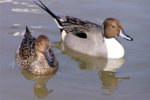
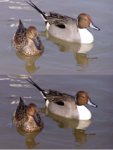
I took this pic the other day (top one) but it seemed too washed out, too drab. The second one I used curves in Photoshop and tweaked to my liking. Is the second one 'better', my wife and kids are split on this one so I thought someone here would care to chime in. What other edits would improve the image? So far my repertoire is pretty limited with Photoshop.

By the way, C720 Auto mode, midday sun, reluctant subjects.
 

Attachments

  • Pintails3_copy.jpg
    Pintails3_copy.jpg
    57 KB · Views: 0

g-hog

Well-known member
Joined
Oct 8, 2002
Messages
1,166
Reaction score
0
Got to agree with MrRee on this one.

The colors in the second one seem to be more vivid, at least to this untrained eye, but then again I don't have my glasses on right now
<


GHog
 

weto

Well-known member
Joined
Aug 27, 2003
Messages
348
Reaction score
4
I have to vote for #2 as well. No suggestions as my skills are even more limited.

-weto
 

Backcountry

Well-known member
Joined
Aug 21, 2003
Messages
4,135
Reaction score
3
Indeed the colors are more vivid in #2; however, if I have to choose I prefer #1 because to me it seems that the contrast is better in #1, and thus I can see a bit more detail in the feathers on the tail end of both ducks, and on the head of the hen. I'd keep at it, but always save any changes to a new filename so that you keep the original for further tweaking. Maybe you can split the difference between #1 and #2 so that you can get richer colors and sharp contrast? Also, since file size is not an issue, you can set the compression to zero (if that's an option) and the result should be a sharper pic.

Either way, that's a nice photo!

Backcountry
 

Maverick

Well-known member
Joined
Nov 29, 2001
Messages
1,360
Reaction score
3
I say pic 1. then I played with it. But I have no clue what I'm doing ..lol
 

Attachments

  • ducks.jpeg
    ducks.jpeg
    50 KB · Views: 0

Pasco

Well-known member
Joined
Mar 13, 2001
Messages
800
Reaction score
1
Originally posted by Maverick@Jan 21 2004, 08:16 PM
But I have no clue what I'm doing ..lol
Yeah, me too.
<


Thanks for the comments.

Maverick, looks like you just about split the middle with your fix, looks good.

Backcountry, that's what my wife said, I don't yet understand your compression comment, gotta learn a bit about that.

Do any photoshop users out there have a favorite tool, Curves seems to do a lot, but I know I'm just scratchin' the surface.
 

WildBird

Well-known member
Joined
Nov 12, 2002
Messages
394
Reaction score
0
Pasco - It's hard to get a good sharp, well exposed pic of moving ducks. I have a C-730. I like to use the spotmeter and set the exposure for a bright area, half press the release button, recompose then shoot. I like using shutter priority, set to at least 1/500 and use a monopod. The overall effect will be to underexpose, but you can bring it up in PS. This will retain detail in the lighter feather areas. If the highlights are blown, they are gone forever.

A tip for using levels and curves. Make seperate adjustment layers. For levels I select the adjustment layer icon button at the bottom of the layers pallate, then select levels. I only adjust the black and white ends of the histogram with this layer, and do not move the middle slider. Next, I use curves to make a seperate layer and adjust this one for only the middle tones.

Give it a try and see if it works for you. WB
<
 

Latest Posts

QRCode

QR Code
Top Bottom